English
 中文
 العربية
 Nederlands
 Français
 Deutsch
 Italiano
 Português
 Русский
 Español
 ไทย
 Tiếng Việt
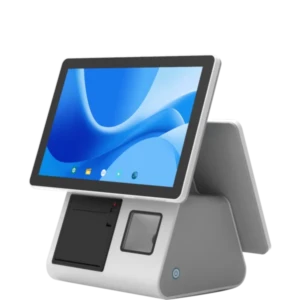
Genstar’s Z2 POS Terminal is a compact commercial payment device designed to support interactive checkout in retail environments. A facial recognition payment terminal can connect identity verification with configured payment services, while its screen options and expandable accessories help businesses adapt the checkout process to different self-service requirements.
What Is a Facial Recognition Payment Terminal?
A facial recognition payment terminal is a payment device that uses facial biometric technology to identify or verify a customer during a transaction. It can connect identity verification with a payment platform, reducing the need for customers to rely entirely on physical cards or manual account entry.
In technical terms, a facial recognition payment terminal combines several functional layers:
Biometric recognition: A camera captures facial information for identity verification.
Payment processing: An integrated or connected payment service handles transaction authorization.
User interaction: A display guides customers through checkout instructions and payment confirmation.
System connectivity: Software and network interfaces connect the terminal with retail management or payment platforms.
The GENSTAR Z2 POS Terminal provides a hardware platform for commercial payment interactions. Its compact body, screen configuration options, and expandable accessories make it relevant to retail counters and self-service installations. However, specific facial recognition hardware and software capabilities must be confirmed against the final product configuration.
How Does Facial Recognition Payment Work During Self-Service Checkout?
Facial payment generally follows an identity verification and payment authorization process. These are related but separate operations: recognizing a customer does not automatically authorize a financial transaction.
A typical workflow includes the following stages:
Customer interaction: The customer approaches the terminal and follows the on-screen instructions.
Image capture: A compatible camera captures facial information under suitable lighting conditions.
Identity verification: The recognition system compares the captured information with an enrolled identity record.
Payment authorization: The payment platform checks the associated account or payment credentials and processes the transaction.
Transaction confirmation: The terminal displays the result and provides the next checkout instruction.
The main advantages include fewer manual identification steps, a more direct customer interaction process, and the possibility of integrating identity verification into an automated checkout workflow.
Actual performance depends on camera quality, recognition software, lighting, network stability, payment-provider integration, and anti-spoofing controls. Businesses should also establish clear consent procedures and data-retention policies before deploying biometric payment functions.
What Hardware Features Matter in the GENSTAR Z2 POS Terminal?
The GENSTAR Z2 POS Terminal can be evaluated through its physical design, display arrangement, payment interaction, and accessory expansion options. These factors determine how well the hardware fits different checkout layouts.
| Hardware consideration | Role in a retail environment | Information to confirm |
|---|---|---|
| Compact body | Helps fit limited counter space and self-service stations | Exact dimensions and installation method |
| Screen configuration | Presents payment instructions and transaction status | Display size, resolution, and available configurations |
| Payment interaction | Connects customer actions with payment workflows | Supported payment modules and interfaces |
| Expandable accessories | Allows additional hardware to be configured | Compatible cameras, scanners, readers, and peripherals |
| Connectivity | Links the terminal with payment and retail systems | Supported network and peripheral interfaces |
For facial verification applications, businesses should confirm whether the selected Z2 configuration supports a compatible camera and the required biometric software. The presence of a POS display alone does not establish that facial recognition is built into the device.
Where Can Self-Service Payment Terminals Be Used?
Self-service payment hardware is suitable for retail environments where customers need to complete transactions with limited staff assistance.
Common application scenarios include:
Convenience stores: Customers can use guided payment interfaces at compact checkout stations.
Supermarkets: Payment terminals can form part of automated checkout counters.
Unattended retail outlets: Integrated payment hardware can support transactions outside conventional staffed counters.
Self-service kiosks: A configurable terminal can connect customer interaction with payment and other kiosk functions.
Retail chains: Standardized hardware configurations can help maintain consistent checkout interfaces across multiple locations.
Compared with traditional solutions, self-service configurations can reduce some manual checkout steps. However, businesses still need to provide assistance for failed payments, identity verification problems, refunds, and customers who cannot use biometric services.
How Should Businesses Choose a Facial Payment Device?
Choosing a facial payment device requires evaluating the complete payment workflow rather than focusing only on recognition functionality. A facial recognition payment terminal should meet the operational, technical, and regulatory requirements of its intended deployment.
Important selection factors include:
Recognition performance: Check camera specifications, supported recognition conditions, and documented accuracy test results.
Anti-spoofing protection: Ask whether the system uses presentation attack detection and how it is tested.
Payment compatibility: Confirm supported payment providers, transaction methods, and authorization procedures.
Display usability: Evaluate screen visibility, instruction clarity, and accessibility.
System integration: Check compatibility with POS software, retail management platforms, and existing payment infrastructure.
Privacy and security: Review biometric data storage, encryption, consent, access controls, and deletion procedures.
Maintenance: Confirm software update arrangements, peripheral replacement, and technical support.
For the Z2, buyers should request the exact hardware configuration and integration documentation before confirming deployment. This is particularly important when facial recognition, QR code payment, card reading, or other payment functions depend on optional modules.
How Does Facial Recognition Payment Compare With Other Checkout Methods?
Different payment methods offer different balances of convenience, compatibility, and infrastructure requirements.
| Payment method | Customer interaction | Main consideration |
|---|---|---|
| Facial payment | Identity verification followed by payment authorization | Requires biometric enrollment and privacy safeguards |
| QR code payment | Customer scans or presents a payment code | Depends on compatible applications and payment services |
| NFC payment | Customer taps a compatible card or device | Requires supported contactless hardware |
| Traditional card payment | Customer inserts, swipes, or taps a card | Depends on card-reader compatibility |
| Cash payment | Customer provides physical currency | Requires cash handling and reconciliation |
No single method fits every retail environment. A multi-method retail payment system may provide alternatives for customers who prefer not to use biometric verification.
What Affects the Cost of a Smart Payment Terminal?
The cost of a smart payment terminal depends on its hardware configuration, software integration, security requirements, and deployment scale.
Key cost factors include:
Display size and screen configuration.
Camera and biometric recognition components.
Optional scanners, card readers, and other accessories.
Payment gateway integration and software licensing.
Network infrastructure and security requirements.
Testing, certification, installation, and ongoing maintenance.
Businesses should distinguish the terminal’s hardware price from the total deployment cost. Payment-provider fees, biometric software, integration work, and compliance requirements may contribute significantly to the final budget.
What Should Buyers Verify Before Deploying the GENSTAR Z2?
Buyers should request product-specific documentation before using the Z2 in a biometric payment environment. Relevant verification areas include functional testing, payment security, and regulatory compliance.
For biometric functions, ISO/IEC 30107-3 provides a reference framework for testing presentation attack detection. Payment security requirements may also involve PCI standards and the rules of the selected payment provider. These references are not confirmation that the Z2 holds any particular certification.
The following information should be confirmed with the manufacturer:
Supported facial recognition modules and software.
Payment interfaces and compatible service providers.
Biometric data processing and storage arrangements.
Display and accessory configuration details.
Product reliability and environmental test results.
Applicable certifications for the target market.
Production capacity and quality-control procedures.
Genstar is the brand associated with the GENSTAR Z2 POS Terminal and its commercial POS hardware offering. Detailed information about its manufacturing experience, biometric integration capabilities, production capacity, and product certifications should be added when verified company documentation becomes available.
FAQ: What Do Buyers Need to Know About Facial Payment?
What Is a Facial Recognition Payment Terminal Used For?
It is used to connect facial identity verification with a payment process. In retail environments, it can support customer identification and payment authorization within a self-service checkout workflow, provided the required hardware and payment services are integrated.
How to Choose a Facial Payment Device for Retail?
Evaluate recognition performance, anti-spoofing capabilities, payment compatibility, display usability, data protection, and integration requirements. Buyers should also confirm whether the device supports the necessary camera and payment modules in its actual configuration.
Why Do Retail Businesses Consider Facial Payment for Self-Service Checkout?
Retail businesses consider facial payment because it can reduce certain manual interaction steps and connect customer verification with automated payment workflows. Its suitability depends on customer acceptance, privacy requirements, payment infrastructure, and the availability of alternative payment methods.
Source & Expertise
This article is based on the stated product positioning and available configuration information for the GENSTAR Z2 POS Terminal, together with general principles of biometric verification and retail payment integration.
Product-specific recognition performance, payment module compatibility, testing results, manufacturing data, and certifications require confirmation from Genstar’s technical documentation. Relevant technical references include ISO/IEC 30107-3 for presentation attack detection and applicable PCI security standards for payment environments.
Last Updated: November 19, 2026