English
 中文
 العربية
 Nederlands
 Français
 Deutsch
 Italiano
 Português
 Русский
 Español
 ไทย
 Tiếng Việt
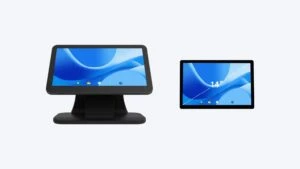
Counter space is valuable in small retail stores, cafés, and other customer-facing businesses. A traditional checkout setup may require separate space for a display, payment equipment, cables, and additional accessories, leaving less room for daily operations. A compact POS terminal helps address this challenge by combining essential checkout functions within a streamlined desktop design. With its 14-inch display, multiple stand configurations, and integrated structure, the GENSTAR 143T offers a practical option for businesses that want to keep their checkout areas organized.
How Does a Compact Design Save Counter Space?
The physical size and layout of a POS system directly affect how much usable counter space remains. A compact POS terminal uses a streamlined body and integrated stand to create a more organized desktop setup. Instead of arranging a large display and separate mounting components, businesses can position the main unit within a smaller working area. Moreover, this design leaves more room for handling products, preparing orders, and interacting with customers. For small stores with limited counter dimensions, an efficient layout can make everyday checkout activities more comfortable.
Why Is a 14-Inch Display Suitable for Retail Operations?
Screen size influences how easily employees interact with a POS system throughout the working day. The GENSTAR 143T features a 14-inch display, providing a practical viewing area for accessing checkout interfaces and reviewing transaction information. At the same time, its screen size works with the compact desktop structure to avoid making the entire workstation unnecessarily bulky. In addition, the product design showcases a clear display layout that supports convenient interaction. This balance between screen visibility and space efficiency makes the device suitable for businesses that need a functional checkout station. A compact POS terminal combines a practical screen size with a space-saving structure, making it suitable for limited checkout areas.
How Do Different Stand Configurations Improve Flexibility?
Different businesses have different preferences for positioning their checkout equipment. Some may prefer a traditional desktop arrangement, while others need an adjustable screen angle to suit their counter layout and working habits. The GENSTAR 143T showcases multiple stand configurations, giving buyers different ways to arrange the display according to their workspace. Furthermore, its design emphasizes a compact body and minimalist appearance, helping the terminal fit into different store interiors. Consequently, businesses can consider both available counter space and employee operating habits when choosing a suitable configuration.
What Makes a Desktop Android POS Machine Useful?
The operating system plays an important role in how employees access and use point-of-sale applications. A desktop android pos machine combines an Android-based platform with a desktop terminal format, providing a familiar environment for compatible POS software. The GENSTAR 143T highlights Android support as part of its product design, making it relevant to businesses looking for an Android-based checkout solution. Moreover, its integrated screen and stand help create a unified workstation. However, buyers should confirm software and peripheral compatibility before selecting a terminal for their specific business requirements.
Which Features Help Small Businesses Organize Their Checkout Areas?
A pos terminal for small businesses should support daily operations without making the checkout counter difficult to manage. The GENSTAR 143T combines several visible design features that help businesses plan their workstations more effectively.
| Product Feature | Practical Value |
|---|---|
| 14-inch display | Provides a practical screen area for checkout interactions |
| Compact body | Helps reduce the space occupied by the main terminal |
| Multiple stand configurations | Offers flexibility when arranging the workstation |
| Android platform | Supports compatible Android-based POS applications |
| Multiple onboard interfaces | Provides connection options for compatible peripherals |
| Minimalist design | Fits different retail and service counter environments |
In addition, the product page presents application scenarios covering retail and food service environments. These examples show how the terminal can fit into different customer-facing workspaces. Nevertheless, the specific software and connected devices should be checked according to each business’s actual workflow.
What Should Buyers Consider Before Choosing a Point of Sale Terminal?
Selecting a point of sale terminal involves more than comparing screen size and exterior appearance. Buyers should evaluate the available counter space, preferred stand configuration, operating system, connection requirements, and compatibility with existing checkout software. They should also consider the types of peripherals used in daily operations, such as printers, scanners, and payment devices. Before purchasing, it is helpful to review the following points:
Counter dimensions: Check the available installation area and leave enough room for employee movement.
Display requirements: Consider whether a 14-inch screen suits the daily checkout workflow.
Stand configuration: Select a display position that matches the counter layout and viewing angle.
Software compatibility: Confirm that the Android platform supports the intended POS applications.
Peripheral connections: Review the detailed interface specifications before connecting external equipment.
By considering these factors in advance, businesses can select equipment that fits their existing operations instead of adding unnecessary components to an already crowded counter.
Conclusion
An efficient checkout setup can help small businesses make better use of limited counter space while keeping daily operations organized. The GENSTAR 143T combines a 14-inch display, compact body, multiple stand configurations, Android support, and onboard interfaces in one desktop design. For businesses seeking a practical checkout solution, Genstar offers a terminal designed to balance display usability with workspace efficiency. Ultimately, choosing the right equipment can help create a cleaner counter layout and a more convenient checkout experience.