English
 中文
 العربية
 Nederlands
 Français
 Deutsch
 Italiano
 Português
 Русский
 Español
 ไทย
 Tiếng Việt
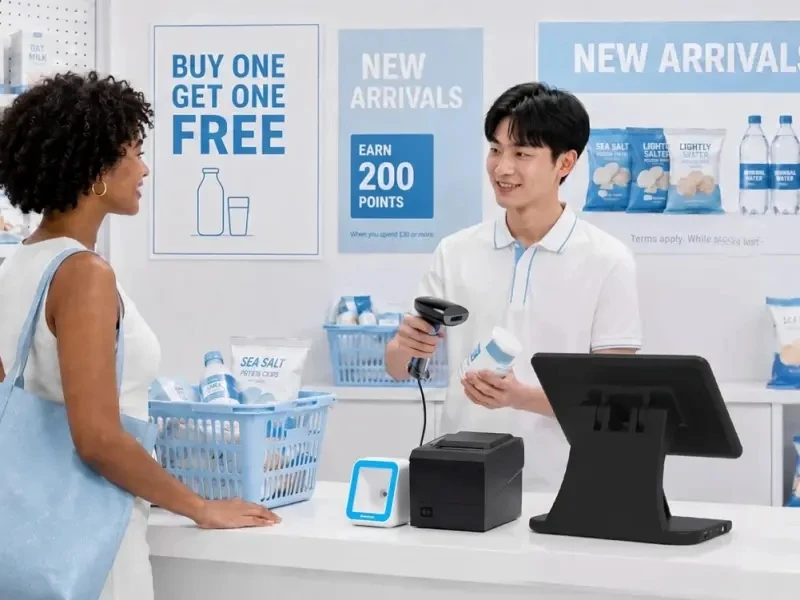
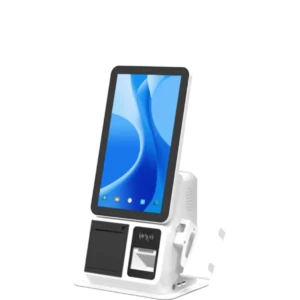
Convenience stores often handle frequent customer transactions, especially during busy periods when employees need to manage checkout, product restocking, and customer assistance at the same time. Self-service equipment can help reduce some of this workload by allowing customers to interact with a digital ordering interface independently. A self-service kiosk with a printer combines a touchscreen display and built-in printing functionality in one integrated unit, supporting a more organized checkout process. With its configurable screen options and expandable modules, the GENSTAR G2 provides a practical solution for convenience stores and other customer-facing businesses.
How Does a Built-In Printer Improve Self-Service Checkout?
Printing functionality is an important part of many unattended checkout workflows. Customers may need a printed receipt or transaction record after completing an order, and an integrated printer allows the kiosk to handle this step within the same workstation. Instead of requiring a separate printing device and additional counter connections, the built-in printer helps create a more unified installation. Moreover, this arrangement can simplify equipment placement and reduce the number of separate devices around the checkout area. For convenience stores with limited space, combining display and printing functions can make the self-service station easier to organize.
Why Is a Large Touchscreen Important for Customer Interaction?
The touchscreen is the main interface through which customers interact with a self-service system. The GENSTAR G2 features a 15.6-inch display, providing a practical viewing area for compatible ordering and checkout applications. A larger screen can make product information, menus, and transaction instructions easier to present, depending on the software interface. In addition, the vertical display design helps create a clear interaction area for customers standing in front of the kiosk. This layout is useful in convenience stores and fast-food environments where customers need to complete transactions through a straightforward digital interface.
How Do Expandable Modules Support Different Business Needs?
Different businesses require different combinations of functions from their self-service equipment. The GENSTAR G2 features an expandable modular design, allowing businesses to consider additional components according to their application requirements. Furthermore, the product supports customizable single-screen or dual-screen configurations, providing flexibility for different installation environments. A single-screen setup can focus on customer interaction, while a dual-screen arrangement may suit locations that need separate display functions. Consequently, businesses can evaluate their checkout workflow and select a configuration that matches their operational needs.
What Makes a Self-Service Kiosk With Printer Suitable for Convenience Stores?
Convenience stores need checkout equipment that supports frequent customer interactions without making the store layout difficult to manage. A self-service kiosk with printer brings the touchscreen and printing functions together, helping create a dedicated customer-operated station. Customers can interact with compatible ordering or checkout software, while the integrated printer supports the printing stage of the process. Moreover, the kiosk format can help stores organize customer flow by providing an additional service point. However, the actual checkout functions depend on the installed software and compatible peripheral configuration.
How Can Different Operating Systems and Interfaces Improve Flexibility?
Software compatibility and connectivity are important when integrating a kiosk into an existing business environment. The GENSTAR G2 product page presents Android and Windows platform options, giving buyers operating system configurations to consider for their intended applications. It also showcases multiple onboard interfaces for connecting compatible external equipment. Therefore, businesses should review the detailed configuration and interface specifications before selecting the terminal. This step helps ensure that the kiosk can work with the required applications and other devices within the checkout environment.
Which Applications Can Benefit From This Kiosk Design?
Although convenience stores are a key application, this kiosk design can also support other customer-facing environments. The product page highlights scenarios including convenience store checkout and fast-food chains, where digital customer interaction can help organize ordering and service activities. Its configurable display and integrated printer make it worth considering for businesses that want to establish a dedicated self-service station.
The following product features illustrate its practical application value:
| Product Feature | Practical Application |
|---|---|
| 15.6-inch touchscreen | Provides a display area for customer interaction |
| Built-in printer | Supports receipt or transaction printing workflows |
| Single or dual screen | Offers different display configurations |
| Expandable modules | Allows configuration based on application requirements |
| Android and Windows options | Provides operating system choices for compatible software |
| Multiple onboard interfaces | Supports connections with compatible external devices |
In addition, businesses should consider their installation space, customer traffic, software requirements, and preferred peripheral connections before selecting a configuration. These factors help determine whether the equipment suits the intended self-service environment.
What Should Buyers Consider Before Choosing a Kiosk Payment Terminal?
A kiosk payment terminal should match the actual checkout process rather than simply provide a touchscreen interface. Buyers need to evaluate the functions required at the self-service station and confirm that the selected hardware configuration supports them. In particular, payment device compatibility, printer functions, operating system requirements, and peripheral connections should be checked before purchasing.
When comparing different models, buyers should pay attention to several considerations:
Screen configuration: Determine whether a single-screen or dual-screen setup better suits the customer interaction process.
Printing requirements: Confirm that the built-in printer supports the intended receipt or transaction printing workflow.
Software compatibility: Check whether the selected Android or Windows configuration supports the required applications.
Expandable components: Identify which additional modules are needed for the intended installation.
Connectivity: Review the onboard interfaces to confirm compatibility with external devices.
By evaluating these requirements in advance, businesses can select a suitable kiosk configuration and avoid unnecessary hardware adjustments after installation.
Conclusion
A self-service kiosk with a printer can help convenience stores organize unattended checkout by combining touchscreen interaction and built-in printing in one integrated device. The GENSTAR G2 adds further flexibility through its 15.6-inch display, expandable modules, customizable single or dual-screen configurations, and operating system options. For convenience stores, fast-food chains, and other customer-facing businesses, these features provide a practical foundation for different self-service applications. Ultimately, selecting the right configuration helps businesses build a more organized checkout station while supporting convenient customer interaction.