English
 中文
 العربية
 Nederlands
 Français
 Deutsch
 Italiano
 Português
 Русский
 Español
 ไทย
 Tiếng Việt
A floor-standing self-service kiosk provides businesses with a convenient way to organize customer interactions, product selection, and self-service operations. Unlike traditional service counters, a kiosk can give customers direct access to digital information and interactive functions without requiring constant assistance from staff. In addition, flexible installation options allow businesses to adapt the equipment to different floor plans and service areas. These features make self-service technology useful for retail stores, hospitality environments, and other customer-facing locations.
As businesses look for ways to improve space utilization, the physical design of a kiosk becomes increasingly important. A built-in shelf can provide a convenient area for placing items during self-checkout, while wall mounting offers another installation option for locations with limited floor space. Therefore, selecting a suitable kiosk design involves considering both customer convenience and the available installation area.
How Built-in Shelves Improve Self-Service Efficiency
A built-in shelf provides customers with an additional surface during self-service operations. For example, users can place personal belongings or selected items on the shelf while interacting with the touchscreen. This arrangement can make the checkout process more convenient, especially in locations where customers need to manage products and complete transactions at the same station. The built-in shelf design also helps combine different functions within one equipment structure. Instead of adding a separate table or counter beside the device, businesses can use the integrated shelf to support everyday customer interactions. However, the actual space-saving benefit depends on the kiosk dimensions, installation position, and surrounding layout.
Key benefits of a built-in shelf include:
Convenient Item Placement: Provides a dedicated surface for customers during self-service operations.
Organized Checkout Area: Combines the display and shelf within one equipment arrangement.
Improved User Experience: Gives customers a more convenient space while completing transactions.
Reduced Additional Furniture Needs: May reduce the need for separate placement surfaces in suitable installations.
Wall or Floor Mounting for Flexible Space Planning
Different business environments require different installation arrangements. A floor-mounted kiosk can be positioned as a standalone service station, making it suitable for open areas, entrances, and customer service zones. By contrast, wall mounting can help free up floor space and keep walkways more open. Consequently, businesses can select an installation method according to their available space and operational requirements. The product shown features both wall and floor mounting options, providing flexibility for different commercial layouts. Before installation, businesses should consider wall structure, mounting support, cable routing, viewing height, and customer accessibility. These details help ensure that the selected position is practical and safe for daily use.
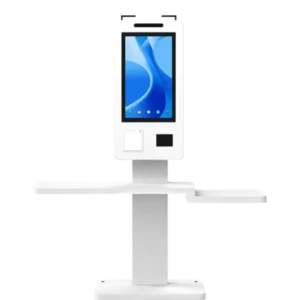
Key Features of the 21.5-Inch Kiosk Display
The displayed product features a 21.5-inch HD touchscreen designed for interactive customer operations. Its large display area provides space for digital menus, product information, service instructions, and other supported interface content. In addition, the touchscreen design allows users to interact directly with the kiosk rather than relying entirely on staff assistance. The product also supports expandable modules, allowing businesses to consider different configurations for their application requirements. The visual presentation indicates Android and Windows compatibility options, while the final operating system and hardware configuration should be confirmed with the supplier before ordering.
| Product Feature | Information Shown | Potential Application Benefit |
|---|---|---|
| Screen Size | 21.5 inches | Provides a larger interaction area |
| Display Type | HD touchscreen | Supports direct user interaction |
| Built-in Shelf | Integrated shelf design | Provides convenient item placement |
| Installation | Wall or floor mounting | Supports flexible space planning |
| Expandable Modules | Modular configuration options | Allows adaptation to different requirements |
| Operating System | Android / Windows options shown | Supports different system requirements, subject to configuration |
Applications of Digital Kiosks in Commercial Spaces
A digital kiosk can support different customer-facing operations depending on its software and hardware configuration. In retail environments, it may provide product information, customer guidance, or self-checkout functions. Similarly, hospitality businesses can consider kiosk equipment for ordering, service registration, and other interactive tasks.
A self-ordering kiosk can also help organize ordering activities in restaurants and food service locations. Customers can review available options and submit orders through a supported interface, while staff focus on preparation and service. Nevertheless, the available functions depend on the installed application, payment hardware, and integration requirements.
Important Factors When Choosing a Kiosk Machine
Selecting a kiosk machine requires more than comparing screen sizes and installation styles. Businesses should evaluate the intended application, available space, customer interaction process, and required hardware modules. For example, a location with limited floor space may benefit from wall mounting, while a busy self-checkout area may require a standalone unit with an integrated shelf.
Before purchasing, businesses should review these factors:
Installation Environment: Confirm whether wall mounting or floor placement is more suitable.
Display Requirements: Evaluate whether a 21.5-inch HD touchscreen meets the intended application needs.
Expandable Modules: Identify which additional hardware functions are required.
Operating System: Confirm the preferred Android or Windows configuration.
Customer Workflow: Consider how users will interact with the screen and built-in shelf.
Genstar Floor-Standing Self-Service Kiosk Solutions for Business Projects
Genstar provides kiosk product options for businesses evaluating interactive equipment for commercial environments. The product’s 21.5-inch touchscreen, built-in shelf, flexible mounting methods, and expandable module design offer several configuration considerations for different projects. When sourcing a floor-standing self-service kiosk, buyers should share their intended application, installation environment, operating system preference, and required modules. Furthermore, confirming the display configuration, mounting method, and software compatibility before ordering can help reduce integration issues. For wholesale and project-based purchasing, these details also help clarify the appropriate product configuration.
Improving Space Utilization with Flexible Kiosk Design
An effective self-service setup should balance customer convenience, installation flexibility, and available space. Built-in shelves provide a practical surface for customer interactions, while wall mounting can help businesses make better use of limited floor areas. Meanwhile, a touchscreen display and expandable modules provide options for different commercial applications. Overall, the right kiosk configuration depends on the business workflow and installation environment. By evaluating shelf design, mounting options, display requirements, and system compatibility in advance, businesses can select equipment that supports organized customer service and efficient use of commercial space.