English
 中文
 العربية
 Nederlands
 Français
 Deutsch
 Italiano
 Português
 Русский
 Español
 ไทย
 Tiếng Việt
A dual-screen countertop POS terminal can help businesses create a more interactive checkout experience by allowing staff and customers to view relevant transaction information during payment. In traditional checkout environments, customers may need to rely on the cashier to explain product details, prices, and payment amounts. However, a customer-facing display can make this information easier to review while the transaction is taking place. As a result, businesses can improve communication at the counter and create a more organized checkout process.
For retail stores, restaurants, and other service businesses, checkout efficiency depends on more than transaction processing speed. Clear information, convenient interaction, and an organized counter layout also influence the customer experience. Therefore, choosing a suitable POS terminal should involve both operational requirements and the way customers interact with the device.
How Customer Displays Help Improve Checkout Speed
A customer display provides a visible area where shoppers can review transaction details, such as item information and payment amounts, depending on the POS software configuration. This reduces the need for repeated verbal confirmation between customers and cashiers. In addition, when both parties can follow the transaction more clearly, staff can focus on completing payment and preparing the next order.
A well-designed dual-screen setup can support several checkout improvements:
Clear Transaction Information: Customers can review displayed details during checkout, helping reduce confusion about prices and payment amounts.
Better Customer Interaction: A customer-facing screen provides another communication point between staff and shoppers.
More Organized Checkout: Both sides can access relevant information without relying entirely on the cashier’s screen.
Smoother Payment Communication: Visible transaction details can help customers understand each stage of the checkout process.
Improved Counter Experience: An integrated display arrangement can help keep the checkout area organized.
However, an additional display does not automatically make every transaction faster. Actual improvements depend on the POS software, payment workflow, staff training, and how the business configures the customer-facing information.
Why Countertop Design Matters for Daily POS Operations
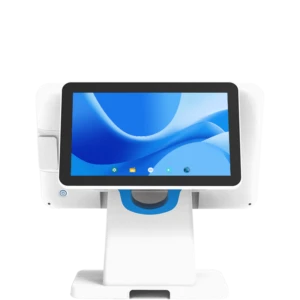
A dual-screen countertop POS terminal needs to balance screen visibility, operating convenience, and available counter space. Since checkout devices are used repeatedly throughout the day, their physical design can influence how comfortably employees interact with the system. A stable stand and suitable screen orientation can also help staff access transaction information during busy periods. The Genstar S1 features a countertop design with different viewing configurations, including front, oblique front, oblique back, and side views. These views help illustrate how the terminal can be positioned and presented in a business environment. Furthermore, its design focuses on providing a human-machine interaction experience for complex business settings.
Choosing Between Desktop POS Terminal and All-in-One POS System Designs
Businesses evaluating a desktop POS terminal should consider the available counter space, user interaction requirements, and compatibility with their existing checkout workflow. An all-in-one POS system may help consolidate key checkout functions into an integrated device, while a separate customer display can provide additional visibility for shoppers. The appropriate arrangement depends on the store’s operating process and the hardware configuration offered.
Before choosing a POS solution, businesses should review the following factors:
Display Arrangement: Confirm whether the device supports a cashier screen, a customer-facing display, or a dual-screen configuration.
Counter Space: Check the terminal’s footprint and viewing angles to ensure it fits the checkout area.
Software Compatibility: Verify that the POS application supports the intended customer display functions.
Daily Workflows: Consider how employees process orders, confirm payments, and handle customer questions.
Peripheral Requirements: Check compatibility with the payment devices, printers, scanners, and other peripherals used by the business.
Important Factors for Selecting a Dual-Screen POS Terminal
When selecting a dual-screen countertop POS terminal, businesses should look beyond the number of displays. Screen placement, viewing direction, software support, and the information presented to customers all affect the practical value of the configuration. For example, a customer display is more useful when the POS software can show clear transaction details at the appropriate stage of checkout.
The following table summarizes several considerations for POS deployment.
| Selection Factor | What Businesses Should Check | Potential Benefit |
|---|---|---|
| Customer Display | Screen visibility and supported content | Clearer transaction communication |
| Screen Position | Front, side, and viewing angles | More convenient counter interaction |
| POS Software | Customer display and transaction support | Smoother checkout workflow |
| Countertop Layout | Device footprint and installation space | More organized work area |
| Peripheral Compatibility | Printers, scanners, and payment devices | Better integration with existing operations |
Applications of Genstar S1 in Business Environments
The Genstar S1 is designed to deliver a comfortable human-machine interaction experience in complex business environments. Its countertop form and multiple viewing configurations make it relevant to businesses evaluating POS hardware for customer-facing service counters. Depending on the supported hardware and software configuration, POS terminals can be used in retail checkout areas, hospitality counters, and other transaction-based environments. For businesses considering a customer display, it is important to confirm the actual screen configuration and supported functions before deployment. In addition, checking the intended installation position and software requirements can help ensure that the selected device matches the business workflow.
Improving Checkout Operations with the Right POS Configuration
A suitable POS configuration brings together hardware design, customer interaction, and transaction management. A dual-screen arrangement can make transaction information more accessible to customers, while an appropriately positioned countertop terminal helps staff manage daily checkout tasks. Nevertheless, the final experience depends on how the device, software, and payment peripherals work together.
Genstar provides POS terminal options for businesses evaluating hardware for modern checkout environments. When selecting a configuration, buyers should consider the intended application, display requirements, counter layout, and software compatibility. By reviewing these factors before deployment, businesses can choose a POS setup that supports clearer communication and a more organized checkout experience.